jQuery Tutorial for Beginners: Learn with Examples (2026)
Introduction
I still remember the first time I tried to make a button hide a div using plain JavaScript. It took me 15 lines of code, three Stack Overflow tabs, and a lot of frustration. Then a senior dev in my college lab said, “Bhai, just use jQuery.” Two lines later, it worked. That moment genuinely changed how I approached front-end development.
If you’re an Indian developer learning web development — whether you’re a CS student, a self-taught coder, or someone trying to upgrade their freelance skills — this jQuery tutorial is exactly what you need. I’ll walk you through everything from setup to real-world usage, with examples you can actually run today.
At a Glance: jQuery Quick Summary
| Feature | Details |
|---|---|
| What is jQuery? | A fast, lightweight JavaScript library |
| Current Version | jQuery 3.7+ |
| File Size | ~30KB (minified) |
| Primary Use | DOM manipulation, events, AJAX, animations |
| Skill Level | Beginner-friendly |
| Official Docs | jquery.com |
| Best For | Rapid front-end development |
My Personal Experience with jQuery
When I was building my first freelance project — a small business website for a local shop in Pune — I had to add a mobile menu toggle, smooth scroll, and a basic image slider. I was using vanilla JS and it was messy. A friend suggested jQuery, and I was skeptical because I had heard people say “jQuery is dead.”
Here’s what I actually found: jQuery is very much alive for practical, production-ready projects. Especially when you’re working under tight deadlines or on WordPress-based sites, which power nearly 43% of the web. The mobile menu that took me two hours in vanilla JS took 20 minutes with jQuery. That’s the kind of real-world advantage nobody talks about.
The most common mistake I see beginners make is importing jQuery at the top of the <head> tag and then running their scripts before the DOM loads. Always place your jQuery script just before the closing </body> tag, or wrap your code in $(document).ready(). Learned that one the hard way.
What is jQuery and Why Should You Still Learn It?
jQuery is an open-source JavaScript library designed to make DOM manipulation, event handling, AJAX calls, and animations dramatically simpler. It follows a simple philosophy: write less, do more.
Even in 2025, jQuery is used on over 75% of websites that use any JavaScript library, according to W3Techs. If you plan to work with WordPress themes, legacy codebases, or client projects, you’ll encounter jQuery constantly.
Read More: Best Free Typing Tutorial Online Sites to Practice Fast
Setting Up jQuery: 3 Ways to Get Started
1. Using a CDN (Easiest)
Add this line inside your HTML <head> or before </body>:
<script src="https://code.jquery.com/jquery-3.7.1.min.js"></script>
No installation. No setup. Just plug and play.
2. Download and Host Locally
Go to jquery.com, download the minified version, and link it like any local JS file. Good for offline development.
3. Via npm (For Modern Workflows)
npm install jquery
Then import it in your JS file:
import $ from 'jquery';
jQuery Selectors: The Foundation of Everything
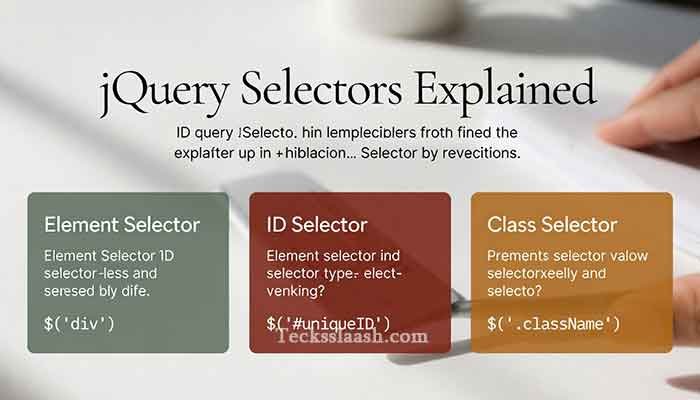
If you understand jQuery selectors, you understand 50% of jQuery. Selectors let you “grab” any HTML element and do stuff with it.
$("p")          // Selects all <p> elements
$("#myId")      // Selects element with id="myId"
$(".myClass")   // Selects all elements with class="myClass"
$("ul li:first") // Selects the first <li> inside a <ul>
This is essentially CSS selector syntax — so if you know CSS, you already have a head start.
jQuery Events: Making Your Page Interactive
Events are how you respond to user actions — clicks, hovers, key presses, form submissions.
$(document).ready(function() {
  $("#myButton").click(function() {
    alert("Button clicked!");
  });
});
The $(document).ready() wrapper ensures your code only runs after the HTML is fully loaded. This is non-negotiable — skip it and half your code will silently fail.
Common Event Methods
| Event Method | Trigger |
|---|---|
.click() | Mouse click |
.hover() | Mouse enter/leave |
.keyup() | Key released |
.submit() | Form submitted |
.on() | Universal event handler |
I personally prefer .on() for everything now because it works for dynamically added elements too — something .click() won’t do on its own.
jQuery DOM Manipulation: Show, Hide, Change
This is where jQuery really shines. Here are the most practical examples:
Hide/Show an element:
$("#box").hide();    // Hides the element
$("#box").show();    // Shows it again
$("#box").toggle();  // Switches between hide/show
Change content dynamically:
$("#title").text("New Heading");         // Changes text
$("#container").html("<p>New HTML</p>"); // Injects HTML
$("#myInput").val("Default Value");      // Sets input value
Add/Remove CSS classes:
$("p").addClass("highlight");
$("p").removeClass("highlight");
$("p").toggleClass("highlight");
jQuery Animations: Add Life to Your UI
$("#box").fadeIn(500);         // Fade in over 500ms
$("#box").fadeOut("slow");     // Fade out slowly
$("#box").slideDown(300);      // Slide down
$("#box").animate({            // Custom animation
  opacity: 0.5,
  left: "200px"
}, 800);
Honestly, the .animate() method alone replaced the need for complex CSS animations in many of my early projects.
jQuery AJAX: Load Data Without Refreshing the Page
AJAX is what allows modern web pages to feel fast and dynamic — loading data in the background without a full page reload.
$.ajax({
  url: "https://api.example.com/data",
  method: "GET",
  success: function(response) {
    console.log(response);
    $("#result").html(response.message);
  },
  error: function() {
    alert("Something went wrong!");
  }
});
Shorthand versions:
$.get("data.json", function(data) { console.log(data); });
$.post("submit.php", { name: "Soyaeb" }, function(res) { console.log(res); });
jQuery vs Vanilla JavaScript: Quick Comparison
| Feature | jQuery | Vanilla JS |
|---|---|---|
| Learning Curve | Easy | Moderate |
| Code Length | Short | Longer |
| Performance | Slightly slower | Faster |
| Browser Support | Excellent | Good (modern) |
| File Size Overhead | ~30KB | 0KB |
| Use in 2025 | Legacy + WordPress | Modern apps |
My take: Use jQuery when working on WordPress, legacy projects, or tight deadlines. Use vanilla JS or modern frameworks (React, Vue) for new SPAs.
Common Problems & Practical Solutions
Problem 1: “$ is not defined” error This means jQuery hasn’t loaded before your script runs. Fix: move your <script> tags so jQuery loads first, or use a CDN link properly.
Problem 2: Click event not working on dynamically added elements Using .click() on elements that didn’t exist at page load won’t work. Fix: use .on("click", selector, handler) attached to a parent element that exists on load.
Problem 3: jQuery conflicts with other libraries If another library also uses $, you’ll get conflicts. Fix: use jQuery.noConflict() to release $ and use jQuery as the alias instead.
Problem 4: Animations are janky on mobile jQuery animations use JavaScript timers, which can lag on low-end devices. Fix: switch to CSS transitions for smoother results, and use jQuery only to toggle classes that trigger those CSS animations.
Frequently Asked Questions
Is jQuery still relevant in 2025?
Yes, especially for WordPress development and legacy projects. Over 75% of sites using a JS library still use jQuery. It’s worth knowing.
Can I learn jQuery without knowing JavaScript?
You can get started, but I’d recommend at least basic JS knowledge first — variables, functions, and the DOM. It’ll make jQuery click much faster (no pun intended).
Where can I find a jQuery tutorial PDF with examples?
The official jQuery Learning Center at learn.jquery.com has downloadable-friendly documentation. You can also save any web page as PDF from Chrome — I’ve done this many times for offline study.
What’s the difference between jQuery and jQuery UI?
jQuery is the core library for DOM manipulation and events. jQuery UI is a separate plugin built on top of it that adds ready-made widgets like date pickers, sliders, and drag-and-drop.
Is jQuery tutorial point a good resource?
TutorialsPoint has decent reference material, but their examples can feel outdated. I’d recommend combining it with the official jQuery docs and real project practice.
Conclusion: My Final Verdict
jQuery isn’t glamorous anymore — React and Vue get all the attention — but for a beginner, it’s one of the fastest ways to go from “I have an idea” to “I have a working webpage.” The learning curve is gentle, the syntax is readable, and the results are immediate.
Start with selectors and events. Build something small — a to-do list, a FAQ accordion, a form validator. That hands-on experience will teach you more than any tutorial, including this one.
If you’re serious about front-end development, learning jQuery will also make you appreciate what modern JavaScript frameworks solve — and that perspective is genuinely valuable.
What was your first experience with jQuery like? Or if you’re just starting out, what part of this tutorial helped you most? Drop a comment below — I read every single one.