Top 5 Java Online Compiler Tools to Use in 2026
Let me paint you a picture. It’s 11 PM, your Java assignment is due tomorrow, and your laptop refuses to cooperate with JDK installation. Sound familiar? I’ve been there — and honestly, that night is what pushed me to properly explore Java online compilers. No setup, no PATH variable headaches, just write and run.
In this post, I’ll walk you through the five best Java online compiler tools I’ve personally tested, so you can pick the right one whether you’re a student cramming for exams or a developer who just wants to quickly test a snippet.
At a Glance – Quick Comparison Table
| Tool | Best For | Free? | Supports Libraries | Mobile Friendly |
|---|---|---|---|---|
| JDoodle | General use | ✅ Yes | ✅ Yes | ✅ Yes |
| Programiz | Beginners | ✅ Yes | ❌ Limited | ✅ Yes |
| GDB Online | Debugging multi-language | ✅ Yes | ❌ No | ⚠️ Partial |
| Replit | Collaborative projects | ✅ Freemium | ✅ Yes | ✅ Yes |
| OneCompiler | Quick code testing | ✅ Yes | ✅ Yes | ✅ Yes |
My Personal Experience with Java Online Compilers
Back in my early days of learning Java, I used to install and reinstall Eclipse every time something broke. It was a mess. Then a college friend introduced me to JDoodle during a hackathon, and that was genuinely a turning point.
What surprised me wasn’t just the convenience — it was the input/output handling. I assumed online compilers were toys. But when I ran a multi-class Java program with Scanner input on JDoodle and it worked perfectly, I realized these tools had matured significantly.
One mistake I see a lot of beginners make: they expect online compilers to handle complex multi-file Maven projects. That’s not what these tools are for. Use them for learning, testing logic, and quick prototyping. For production-level work, IntelliJ is still your friend.
The 5 Best Java Online Compilers – Deep Dive
1. JDoodle – The Most Versatile Java Online Compiler
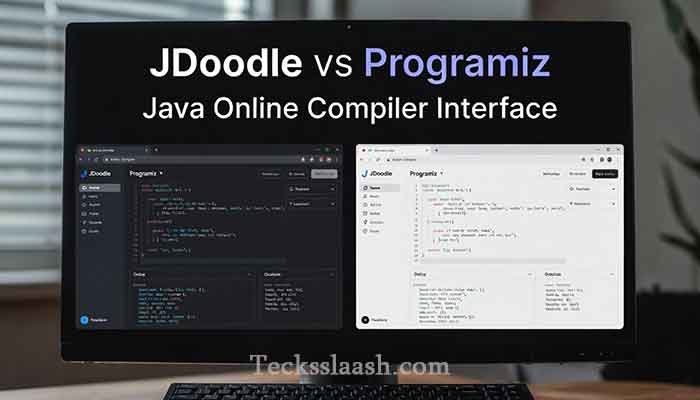
JDoodle is my personal go-to. It supports JDK 17 and gives you a clean two-panel editor — code on the left, output on the right. What I love is the stdin support, meaning you can test programs that take user input without any workarounds.
Key Features:
- Supports multiple JDK versions (you can switch!)
- Share code via a unique URL — great for asking for help on forums
- API access for embedding in your own projects
Read More: JDoodle Official Site — authoritative source for their API documentation.
2. Java Online Compiler Programiz – Perfect for Learners
If you’re just starting out, Programiz’s Java online compiler is the most beginner-friendly option I’ve come across. The interface is minimal and clean, and it comes paired with their Java tutorials — so you can learn and test code on the same platform.
Honestly, this integration is a game-changer for students. You read the concept, scroll down, write the code, run it — all without leaving the page.
Key Features:
- Extremely clean UI with zero distractions
- Built-in examples to help you get started
- Perfect for running basic programs and understanding output
Limitation: Don’t expect Programiz to handle complex programs with external libraries. It’s built for simplicity.
3. Java Online Compiler GDB (GDB Online) – For Multi-Language Debugging
GDB Online is a bit different. It’s primarily known as a C/C++ debugger, but its Java online compiler capability is solid enough for quick tests. The name “GDB” comes from the GNU Debugger, and that debugging-first philosophy shows in the interface.
I personally use GDB Online when I’m switching between Java and C++ in the same session — it saves the cognitive overhead of switching tabs.
Key Features:
- Supports 60+ languages in one place
- Clean editor with syntax highlighting
- Useful for competitive programmers who work in multiple languages
Limitation: The UI feels a little dated compared to tools like Replit, and there’s no collaborative feature.
4. Replit – Best for Collaborative Java Projects
Replit takes online coding to a different level. It’s less of a “quick test” compiler and more of a full online IDE. You get a file system, terminal access, package management, and even the ability to invite others to code with you in real-time.
For group projects or pair programming sessions, nothing else on this list comes close.
Key Features:
- Real-time collaboration (Google Docs style)
- Persistent projects saved to your account
- Supports external Java libraries via Maven
Limitation: The free tier has gotten more restrictive recently. For heavy use, you’ll likely hit limits.
5. OneCompiler – The Fastest No-Login Java Compiler
OneCompiler is what I recommend when someone needs to just run a Java snippet in 10 seconds. No sign-up required, no distractions — paste your code, hit run, see output.
It also has a surprisingly good library of example programs, which is useful if you’re exploring Java syntax quickly.
Key Features:
- Zero sign-up required
- Runs Java fast with clean output
- Supports stdin for interactive programs
- Has a built-in code library for common programs
Feature Comparison – Which Java Online Compiler Wins?
| Feature | JDoodle | Programiz | GDB Online | Replit | OneCompiler |
|---|---|---|---|---|---|
| Multiple JDK versions | ✅ | ❌ | ❌ | ✅ | ❌ |
| Stdin Support | ✅ | ✅ | ✅ | ✅ | ✅ |
| Code Sharing | ✅ | ❌ | ❌ | ✅ | ✅ |
| Collaboration | ❌ | ❌ | ❌ | ✅ | ❌ |
| External Libraries | ✅ | ❌ | ❌ | ✅ | ✅ |
| Mobile Friendly | ✅ | ✅ | ⚠️ | ✅ | ✅ |
Common Problems & Practical Solutions
Problem 1: “My code runs locally but not on the online compiler” This is usually a Java version mismatch. Check which JDK version the tool uses. JDoodle lets you switch versions — try running on JDK 11 or 17.
Problem 2: “The program hangs and never shows output” You probably have a Scanner waiting for input but didn’t provide stdin. Look for a “Stdin” input box in the tool — paste your test inputs there before running.
Problem 3: “I can’t import external libraries” Most basic online compilers don’t support Maven or Gradle. If you need external libraries, use Replit or JDoodle’s API, which offer broader support.
Problem 4: “The compiler is too slow” Free-tier tools throttle performance during peak hours. Try OneCompiler or GDB Online during off-peak times, or consider Replit’s paid plan for consistent speed.
Frequently Asked Questions
Q1: Which is the best Java online compiler for beginners?
Programiz is my top pick for beginners because of its clean interface and built-in tutorials. You can learn and test code in the same place, which is incredibly efficient.
Q2: Can I use a Java online compiler for competitive programming?
Yes, tools like JDoodle and OneCompiler work well for competitive programming. They support stdin, which is essential for reading test cases the way judges’ systems do.
Q3: Is Java online compiler GDB good for Java specifically?
GDB Online works fine for basic Java programs, but it was built with C/C++ debugging in mind. For Java-specific features, JDoodle or Replit are better options.
Q4: Does Programiz Java online compiler support multiple classes?
It has limitations with multi-class programs. For anything beyond a single-class program, I’d recommend switching to JDoodle or Replit.
Q5: Can I use a JavaScript online compiler on these platforms too?
Yes! Most of these platforms — especially JDoodle, Replit, and OneCompiler — support JavaScript as well. So if you’re switching between Java and JS, you don’t need to jump between tools.
Conclusion – My Final Verdict
If I had to pick just one, I’d go with JDoodle for its flexibility, stdin support, and multiple JDK versions. For beginners, Programiz wins hands down. And if you need collaboration, Replit is in a class of its own.
Online Java compilers have come a long way — they’re no longer just toys. Whether you’re a student, a developer testing a quick logic snippet, or someone stuck without a local setup, these tools have your back.
Which Java online compiler do you use most? Have you tried any of these tools, or do you have a favorite I missed? Drop your thoughts in the comments below — I genuinely read every one!