Vedu App Review: Features, Safety & Is It Worth It?
A few months back, a friend from my college WhatsApp group dropped a link saying “bhai yeh Vedu App try kar, free mein sab kuch milta hai.” Sound familiar? That’s exactly how most of us in India discover these third-party streaming apps — through word of mouth, with zero context about whether they’re actually safe.
I decided to dig into the Vedu App properly — not just install and forget, but actually test it, observe its behavior, and find out what you’re really signing up for. In this post, I’ll walk you through everything I found.
At a Glance: Vedu App Quick Summary
| Feature | Details |
|---|---|
| App Type | Third-party APK (not on Play Store) |
| Primary Use | Free streaming of movies & web series |
| Platform | Android only |
| Official Website | Not officially verified |
| Cost | Free |
| Safety Rating | ⚠️ Use with caution |
| My Verdict | Risky for most users; alternatives exist |
What Is Vedu App, Exactly?
The Vedu App is an Android APK that lets users stream movies, web series, and other video content — completely free. It sits in the same category as apps like Cinema HD, BeeTV, or the now-defunct Pikashow. It’s not available on the Google Play Store, which already tells you something important.
You’ll find it circulating on Telegram channels, APK download sites, and tech forums. The content library is decent — Bollywood, Hollywood, OTT content — but the source of that content is the real question mark.
My Personal Experience with the Vedu App
I’ll be honest — I installed it on an old Android phone I keep specifically for testing sketchy apps (a habit I developed after a bad experience years ago where a similar app quietly installed adware on my daily driver phone). That lesson cost me three days of cleanup and a factory reset. Not fun.
When I ran the Vedu APK through VirusTotal before installing, a couple of low-level flags came up — not catastrophically alarming, but enough to make me proceed carefully.
After installation, the app worked. Streams loaded reasonably fast, the UI was basic but functional, and yes — there was content that you’d normally pay for on OTT platforms. But here’s what I noticed:
- Aggressive ad popups that opened browser windows without my permission
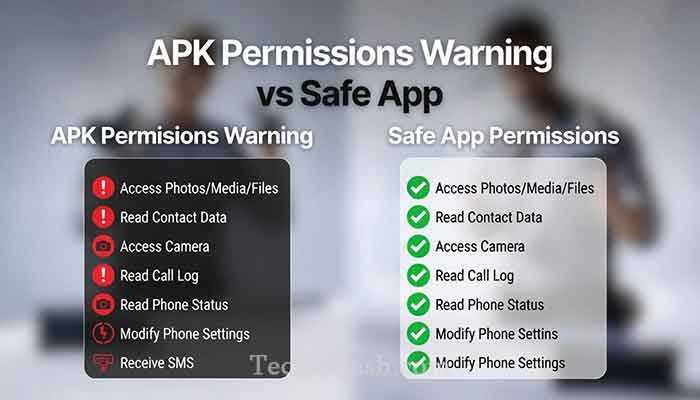
- A request for permissions that had no business being there — like access to contacts and call logs
- No clear developer information anywhere in the app
When I tested network traffic using a simple VPN logger, the app was pinging servers I didn’t recognize. I’m not saying it’s definitely malware, but I am saying that on my personal phone? Absolutely not.
Read More: 91 Club Login Apk Review: Real or Fake? Honest Truth
Is Vedu App Safe to Use?
This is the question everyone’s really asking, and I’ll give you a straight answer: it carries real risks, especially if you’re installing it on your primary device.
Here’s why:
The APK Source Problem Since it’s not on the Play Store, there’s no vetting process. The version someone shares on Telegram might be modified. You genuinely can’t be sure you’re getting the original build.
Permission Red Flags Any streaming app asking for access to your contacts or call logs is a red flag. A video player needs storage and internet — that’s it. Anything beyond that deserves scrutiny.
Legal Gray Zone Most content on Vedu App is pirated. In India, while individual users rarely face prosecution, streaming pirated content is technically illegal under the Copyright Act. It’s a risk worth knowing about.
No Official Support If something goes wrong — data issue, virus, anything — there’s no company to contact. You’re on your own.
How to Install Vedu App (If You Still Choose To)
I’m not going to pretend people won’t install it after reading this. So if you do proceed, here’s how to do it with at least some protection:
- Use a secondary/test device — not your main phone
- Enable a trusted antivirus before downloading anything
- Download only from sites with verified APK checksums — avoid random Telegram links
- Go to Settings → Security → Enable “Install Unknown Apps” for your browser or file manager
- Install the APK, then immediately re-check permissions in Settings and revoke anything suspicious
- Use a VPN to mask your activity, especially given the legal considerations
Vedu App vs. Safer Alternatives
| App | Legal? | Free? | Safe? | Content Quality |
|---|---|---|---|---|
| Vedu App | ❌ No | ✅ Yes | ⚠️ Risky | Moderate |
| MX Player | ✅ Yes | ✅ Yes | ✅ Safe | Good |
| Pluto TV | ✅ Yes | ✅ Yes | ✅ Safe | Moderate |
| JioCinema (Free Tier) | ✅ Yes | ✅ Yes | ✅ Safe | Excellent |
| Tubi | ✅ Yes | ✅ Yes | ✅ Safe | Good |
Honestly, with JioCinema offering IPL and a huge free library, and Tubi having a solid Hollywood catalog — the argument for using a risky app like Vedu gets thinner every year.
Common Problems & Practical Solutions
Problem 1: App crashes immediately after install This usually means you downloaded a corrupted or incompatible APK version. Solution: verify your Android version compatibility and re-download from a different (more reputable) APK source with a checksum match.
Problem 2: Constant pop-up ads redirecting to browser This is the app’s aggressive monetization at work. Enabling a DNS-based ad blocker like AdGuard (set it up at the network level) can help significantly reduce this.
Problem 3: Video buffering constantly Third-party apps like this don’t have CDN infrastructure behind them. Using a good VPN with a nearby server sometimes improves this, but don’t expect Netflix-level performance.
Problem 4: “Unknown source” installation blocked Go to Settings → Apps → Special App Access → Install Unknown Apps, and enable permission for your file manager or the browser you used to download. Disable this permission again after installing.
Frequently Asked Questions
Is the Vedu App available on the Play Store?
No. The Vedu App is not listed on Google Play Store and must be sideloaded as an APK, which bypasses Google’s security checks. This is part of why it raises safety concerns.
Is Vedu App free to use?
Yes, it’s free. But as the saying goes — if you’re not paying for the product, you might be the product. The app monetizes through aggressive advertising and potentially data collection.
Can using Vedu App get me in legal trouble in India?
Streaming pirated content is technically illegal under India’s Copyright Act, 1957. While individual users are rarely prosecuted, the risk exists, particularly as enforcement has increased in recent years.
What is the Vedu APK download size?
Based on versions I’ve seen circulating, it typically ranges between 15–30 MB, though this varies by version.
Are there safe alternatives to Vedu App?
Absolutely. JioCinema, MX Player, Tubi, and Pluto TV all offer free, legal streaming with no safety risks. I’d recommend starting there.
Conclusion: My Final Verdict on Vedu App
Look, I get the appeal — free content is tempting, especially when OTT subscriptions keep adding up. But after testing the Vedu App properly, I can’t in good conscience recommend it for your primary device. The permission overreach, unknown data behavior, and piracy-related legal risk make it a gamble that just isn’t worth it in 2026 when legitimate free options are genuinely good.
If you’re curious and tech-savvy, use it on an isolated test device with a VPN and a proper antivirus. If you’re an everyday user, JioCinema’s free tier alone gives you enough content to keep you busy for months.
My final advice: your device’s security and your data are worth more than a free movie.
Have you used the Vedu App before? What was your experience like — good, bad, or somewhere in between? I’d genuinely love to hear your take in the comments below.