
UPI Payment Safety Tips You Must Follow in 2026
Let me be honest with you — UPI payment has completely changed how India handles money. From splitting restaurant bills to paying your electricity bill at midnight, it’s genuinely magical. But there’s a darker side that most people discover only after losing money.
My cousin lost ₹18,000 last year. Not because he was careless — he’s an engineer. He lost it because he didn’t know one simple thing about how UPI scams actually work. In this post, I’ll walk you through everything I’ve learned so that doesn’t happen to you.
At a Glance: UPI Payment Safety in 2026
| Safety Factor | What You Need to Know |
|---|---|
| Biggest Threat | Collect request / screen-sharing scams |
| Safest Apps | PhonePe, Google Pay, Paytm (official versions only) |
| PIN Rule | Never share UPI PIN — not even with bank staff |
| Verification | Always double-check UPI ID before sending |
| New in 2026 | AI-based fraud detection on most major apps |
| Recovery Window | Report within 24 hours for best chance of reversal |
My Personal Experience with UPI Payment Scams
About 14 months ago, my cousin was selling an old laptop on OLX. A “buyer” called, sounded completely legit, and said he’d pay via UPI. He sent a collect request — my cousin saw the amount looked right, entered his PIN, and the money was gone from his account, not added to it.
That’s the most common trick right now. A collect request is the opposite of receiving money. When you enter your PIN on a collect request, you’re authorizing a payment out of your account. The scammer banks on you not reading the screen carefully.
After that incident, I spent weeks researching UPI fraud patterns. I’ve been writing about Indian fintech on Tecksslaash for a while now, and this topic genuinely shook me. Here’s everything I wish my cousin had known.
The Real UPI Scams Running in 2026
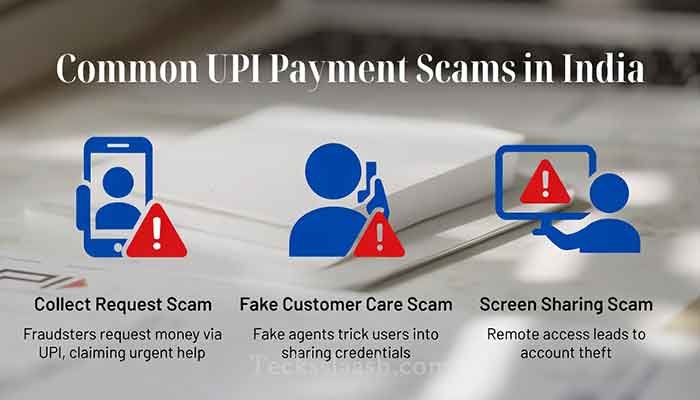
1. The Collect Request Trick
Already explained above — but I can’t stress this enough. If someone is paying you, you never need to enter your PIN. Read that again. Receiving money requires zero PIN input.
If an app asks for your PIN while you’re supposedly getting paid, close it immediately.
2. Fake Customer Care Numbers
Search “PhonePe customer care” on Google and you’ll sometimes see fake numbers in ads. Scammers pose as support staff, ask for your UPI ID, then walk you through “verifying your account” — which is actually them initiating a fraudulent collect request.
Always go to customer care through the official app, never through a number you found on Google.
3. Screen Sharing Scams
Someone calls saying they’ll help you with a failed transaction. They ask you to install AnyDesk or TeamViewer. The moment you do, your phone is their phone. I’ve seen this wipe out entire savings accounts in minutes.
No legitimate bank or UPI app will ever ask you to install a remote access app.
4. Meesho UPI Payment Scams
If you sell or buy on Meesho, be extra careful. Meesho UPI payment fraud typically targets small resellers — someone poses as a Meesho representative offering a “supplier payment” or “cashback” and asks you to verify your UPI ID. They then send a collect request framed as a refund.
Meesho’s actual payment system works through the app only. Any communication asking you to accept a UPI request outside the Meesho app should be treated as suspicious.
Read More: Digital Arrest Scam: What It Is & How to Stay Safe
UPI Safety Tips That Actually Work in 2026
Lock Down Your UPI PIN Behavior
- Change your UPI PIN every 3–6 months
- Never use birth dates or phone numbers as your PIN
- Set up a separate bank account for UPI with a limited balance — keep your main savings elsewhere
Use App-Level Security Features
Most apps now have fingerprint lock and transaction limits. Use both. Google Pay and PhonePe let you set daily transaction caps — set yours to a realistic limit, not the maximum.
Verify Before You Pay
This sounds obvious but people skip it when they’re in a hurry. Before hitting confirm:
- Check the receiver’s name that appears on screen
- Verify the UPI ID character by character (scammers use IDs like “airte1@upi” instead of “airtel@upi”)
- For any amount above ₹500 to a new contact, call and confirm verbally
Enable Transaction Notifications
Keep SMS and app notifications on. If a transaction happens without your knowledge, you want to know within seconds, not hours.
UPI App Safety Comparison (2026)
| Feature | Google Pay | PhonePe | Paytm |
|---|---|---|---|
| AI Fraud Detection | Yes | Yes | Yes |
| Transaction Limit Setting | Yes | Yes | Limited |
| Spam Call Warning | Yes | No | No |
| In-App Customer Support | Good | Good | Moderate |
| Two-Factor for New Payee | Yes | Yes | Yes |
All three are solid — just make sure you’re downloading from the official Play Store or App Store, not a third-party APK.
Read More: NPCI’s official UPI safety guidelines — npci.org.in
Common Problems & Practical Solutions
Problem 1: Money deducted but not received by the other person This is usually a pending transaction, not fraud. Wait 48 hours. If unresolved, raise a dispute through the app — not through a random customer care number.
Problem 2: You accidentally sent money to the wrong UPI ID Immediately raise a dispute in the app and contact your bank’s official helpline. If the recipient refuses to return it, file a complaint at cybercrime.gov.in. Time matters here — act within 24 hours.
Problem 3: You got a suspicious collect request from an unknown ID Decline it immediately. Do not try to “investigate” by accepting and then cancelling — the moment you enter your PIN, the transaction is done. Block the UPI ID and report it in the app.
Problem 4: Your UPI app is showing unauthorized login activity Deregister your UPI immediately from the app settings (usually under “Manage Accounts” or “Settings > Security”). Then contact your bank to put a temporary hold on UPI transactions while you sort it out.
Frequently Asked Questions
Q: Is UPI payment safe for large amounts like ₹50,000 or more?
UPI is technically safe for large amounts, but I personally prefer NEFT/RTGS for anything above ₹25,000 to a new recipient — the verification layer is stronger and there’s better dispute resolution.
Q: Can someone hack my UPI account without my PIN?
Not through the UPI system directly. But if someone has access to your phone or installs malware, they can intercept OTPs. Keep your phone locked and never install apps from unknown sources.
Q: What should I do if I’ve already been scammed via UPI?
Call your bank immediately, file a complaint on the National Cybercrime Portal (cybercrime.gov.in), and report through the app. The faster you act, the better your chance of reversal.
Q: Are Meesho UPI payments safe?
Yes, when done through the official Meesho app. The scams happen when someone contacts you outside the platform claiming to be from Meesho. Meesho doesn’t initiate UPI collect requests through WhatsApp or phone calls.
Q: Does entering my UPI PIN on a collect request mean I’m receiving money?
No — this is the biggest misconception. A collect request that asks for your PIN means you are paying, not receiving. Never enter your PIN when you expect to receive money.
Conclusion: Stay Sharp, Stay Safe
UPI is one of the best things to happen to Indian digital finance — I genuinely believe that. But the convenience also attracts bad actors. The tips I’ve shared aren’t theoretical. They come from real incidents I’ve seen among friends, family, and readers of this community.
My final recommendation: create a dedicated UPI account with only ₹5,000–₹10,000 in it for everyday transactions. Keep your main account separate. That one habit alone limits your maximum possible loss.
Have you ever had a close call with a UPI scam? Or do you know someone who has? Tell me in the comments — your experience might help protect someone else in this community.