Roblox Voice Chat: How to Enable It in 2025
If you’ve ever jumped into a Roblox session and felt like something was missing — like you’re typing messages while everyone else is somehow communicating faster — you’re not alone. I’ve been there. Voice chat in Roblox was one of those features I didn’t even know existed until a younger cousin of mine kept running circles around me in a game because he was coordinating with teammates out loud while I was still fumbling with the chat box.
In this post, I’m going to walk you through exactly how to enable voice chat in Roblox, what the most popular Roblox game is right now in 2025, and yes — how to delete your Roblox account if you’ve had enough. Let’s get into it.
At a Glance — Quick Summary
| Topic | Key Info |
|---|---|
| Voice Chat Availability | Age 13+ with ID verification |
| Platform Support | PC, Mac (mobile support limited) |
| Most Popular Game (2025) | Brookhaven 🏡 |
| Account Deletion | Requires contacting Roblox Support |
| Parental Controls | Available via account settings |
My Personal Experience with Roblox Voice Chat
Okay, real talk. When Roblox first rolled out Spatial Voice — that’s the official name for their voice chat feature — I assumed it would just work automatically. I updated the app, opened a game, and… nothing. No microphone icon, no settings option, nothing.
Turns out I’d made the most common mistake: I hadn’t completed the age verification step. Roblox requires it before unlocking voice chat, and they’re strict about it. I had to upload a valid government ID through their third-party verification partner (Veriff). Took about 5 minutes, and honestly, once it was done, the feature unlocked immediately.
One thing I’ll say from experience — the spatial audio aspect is genuinely impressive. In games that support it, you can actually hear players’ voices get louder as they move closer to you in the game world. It adds a whole new layer to the experience.
How to Enable Voice Chat in Roblox — Step by Step
Before anything else, know this: voice chat is only available to users aged 13 and above, and Roblox requires identity verification to activate it. This is a child safety measure, and I think it’s actually a smart one.
Step 1: Verify Your Age
- Log in to your Roblox account on a browser (not the app)
- Go to Account Settings → Privacy
- Scroll down to find “Verify My Age”
- Click it and follow the prompts via Veriff — you’ll need a government-issued ID (Aadhaar works for Indian users)
Step 2: Enable Voice Chat in Settings
Once verified:
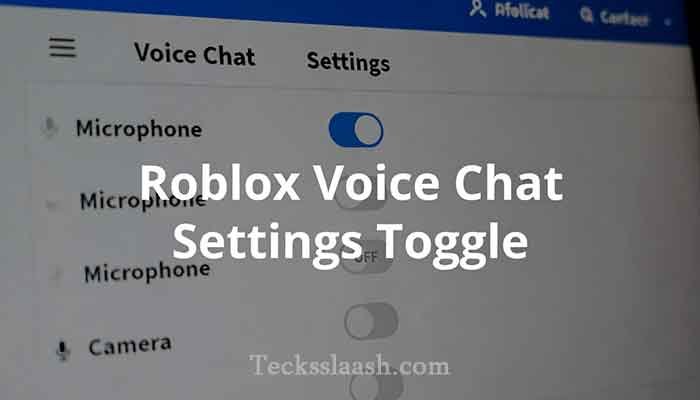
- Go to Settings → Privacy
- Find the “Enable Microphone” toggle
- Switch it On
Step 3: Check In-Game Support
Not every Roblox game supports voice chat. You’ll see a microphone icon in the top-right corner of supported games. If you don’t see it, that particular game hasn’t enabled Spatial Voice yet.
Step 4: Grant Microphone Permission
Your browser or device will ask for microphone permission the first time. Make sure you allow it — otherwise the feature simply won’t work even if everything else is set up correctly.
💡 Pro tip: If you’re on a laptop, test your mic in Windows/Mac settings first before blaming Roblox.
What Is the Most Popular Game in Roblox in 2025?
This question comes up constantly, and the answer might surprise you if you’ve been away from the platform for a while.
As of 2025, Brookhaven 🏡 continues to hold an insane player count — consistently pulling tens of millions of visits. It’s an open-world roleplay game where players basically live out a virtual life. No objectives, no end goal — just pure social sandbox fun. Indian players especially love it because of how casual and community-driven it is.
That said, here are the other heavy hitters right now:
| Game | Genre | Why It’s Popular |
|---|---|---|
| Brookhaven 🏡 | Roleplay | Social, relaxed, massive community |
| Adopt Me! | Simulation | Pet trading, constant updates |
| Blox Fruits | Action RPG | One Piece-inspired, competitive |
| Murder Mystery 2 | Social Deduction | Great with friends and voice chat |
| Pet Simulator 99 | Idle/Clicker | Addictive progression loop |
If you’re trying voice chat for the first time, I’d honestly recommend Murder Mystery 2 — it’s way more fun when you can actually talk to your team in real time.
How to Delete Your Roblox Account
Here’s the thing Roblox doesn’t make obvious: you cannot delete your account directly from the app or website settings. I know, it’s frustrating. But here’s the actual process:
Option 1: Contact Roblox Support (Official Method)
- Go to Roblox Support — [External Link: Roblox Official Support Page]
- Submit a request under “Account Settings”
- Select “Delete Account” as the issue type
- Provide your username and registered email
- Roblox will send a confirmation email and process the deletion
Option 2: Deactivate Instead
If you just want to step away temporarily, consider simply removing your personal info, revoking app permissions, and logging out. Your account will go dormant without permanent deletion.
⚠️ Important: Once deleted, your Robux, items, and game progress are permanently gone. There’s no recovery option. Think twice.
Read More: Minecraft Download Free – Easiest Ways to Play in 2026
Common Problems & Practical Solutions
Problem 1: Voice chat option not showing in settings This almost always means your age verification hasn’t gone through yet, or it’s still processing. Wait 24 hours after verification and check again. If it still doesn’t appear, clear your browser cache and try on a different browser.
Problem 2: Mic works in other apps but not Roblox Roblox uses browser-level microphone permissions. Go to your browser settings → Site Permissions → Microphone, and make sure Roblox is allowed. This trips up a lot of people.
Problem 3: Other players can’t hear you Check that you’re in a game that actually supports Spatial Voice. Also make sure you haven’t accidentally muted yourself — there’s a small mic icon in the upper right during gameplay. Click it to toggle.
Problem 4: Account deletion request not getting a response Roblox support can take 3-5 business days. If you haven’t heard back in a week, follow up with the same ticket number. Don’t submit multiple requests — it slows things down.
Frequently Asked Questions
Can I use Roblox voice chat without ID verification?
No. As of 2025, Roblox requires age verification through a valid government ID for all users who want to use Spatial Voice. There’s no workaround.
Is voice chat available on Roblox mobile?
Partially. Mobile support has been rolling out but is inconsistent across devices. PC/Mac via browser remains the most reliable option.
What happens to my Robux if I delete my account?
All Robux and purchases are permanently lost. Roblox does not offer refunds for account deletions.
How do I know if a Roblox game supports voice chat?
Look for a microphone icon in the top-right corner of the game screen. If it’s not there, that game doesn’t have Spatial Voice enabled.
Is the most popular Roblox game in 2025 still Adopt Me?
Adopt Me remains massively popular, but Brookhaven has been holding the top spot for active concurrent players through 2025. Both are worth trying.
Conclusion — My Final Verdict
Enabling voice chat in Roblox genuinely changes how you play, especially in team-based or social games. The verification process is a small hassle, but it’s a one-time thing and takes less than 10 minutes. Once you’re through it, the Spatial Voice feature is one of the better implementations I’ve seen in an online gaming platform.
If you’re new to Roblox, start with Brookhaven or Murder Mystery 2 — both shine with voice chat enabled. And if you’re looking to leave the platform entirely, just remember the account deletion process takes a few days through support, and it’s permanent.
Have you tried Roblox voice chat yet? Did the verification process give you any trouble? Drop your experience in the comments — I read every single one and I’d love to know how it went for you.