Flashing Tech: Best Flashing Software for Mobile Phones
If you’ve ever gotten your hands on a bricked Android phone—or just wanted to install a custom ROM to breathe new life into an old device—you know how overwhelming the flashing world can feel. There’s SP Flash Tool, Odin, Miracle Box… the list never ends. And if you’re an Indian tech user like most of our readers here at Tecksslaash, you’ve probably also dealt with budget phones from brands like Redmi, Realme, or Samsung that need firmware fixes every now and then.
Flashing Tech, as a concept and a growing category of tools, is something I’ve personally spent years navigating. In this post, I’ll break down the best flashing software for mobile phones—what actually works, what I’ve burned my fingers on, and what you should use based on your device.
At a Glance: Flashing Tech Summary Table
| Feature | Details |
|---|---|
| Best for Samsung | Odin Flash Tool |
| Best for MediaTek (MTK) | SP Flash Tool |
| Best Flashing Tech App (Android) | TWRP Recovery |
| Best Flashing Tech Online Option | WebADB / Online ADB Tools |
| Best Flashing Software for PC | Miracle Box / NCK Pro Box |
| Skill Level Required | Intermediate |
| Risk Factor | Medium-High (if done incorrectly) |
| Cost | Mostly Free (some paid options) |
My Personal Experience with Flashing Tech
Let me be honest with you—my first attempt at flashing a phone was a disaster.
It was 2019. I had a Redmi Note 5 Pro that got stuck in a bootloop after a failed MIUI update. A friend told me to just “flash the firmware, it’s easy.” Famous last words. I downloaded a random ROM from some obscure forum, used the wrong version of SP Flash Tool, and ended up with a completely unresponsive device for two days.
What saved me? Going back to basics. I found the official firmware from Xiaomi’s website, matched the exact model number (not just the name—model numbers matter a lot), and used SP Flash Tool v5.1920 specifically for my MTK chipset. The phone came back to life.
That experience taught me the single most important rule in flashing: the right tool for the right chipset. Qualcomm devices don’t play well with MTK tools and vice versa. I’ve seen so many people in forums skip this step and then wonder why their phone won’t respond.
What Is Flashing Tech and Why Does It Matter?
Flashing, in simple terms, means writing new software directly onto your phone’s memory. This could be official firmware, a custom ROM, or even a recovery image. Flashing Tech refers to the ecosystem of tools, apps, and methods that make this possible.
People flash phones for several reasons:
- Unbrick a dead phone stuck in bootloop or fastboot mode
- Upgrade or downgrade firmware that couldn’t be updated OTA
- Install custom ROMs like LineageOS for better performance
- Remove bloatware by flashing a clean ROM
- Repair IMEI or network issues on older devices
The demand for flashing knowledge is especially high in India because we use a wide variety of budget Android phones—many of which run MediaTek chipsets and have a strong modding community around them.
Best Flashing Software for PC
1. SP Flash Tool (Best for MediaTek Phones)
If you have a MediaTek-based phone—think older Realme, Tecno, Infinix, or some Redmi models—SP Flash Tool is your best friend.
What I like about it: It’s free, regularly updated, and handles scatter-based flashing exceptionally well. The Download Only mode is a lifesaver when you want to flash without wiping data.
Watch out for: Driver issues on Windows 11. You’ll often need to install MTK USB drivers manually, and that step trips up a lot of beginners.
Read More: Official SP Flash Tool releases on GitHub
2. Odin Flash Tool (Samsung Only)
Odin is Samsung’s semi-official flashing tool, and it’s the go-to for flashing stock firmware or custom recoveries on Galaxy devices.
My take: It’s incredibly stable. I’ve used it to restore Samsung A-series phones that were completely dead, and the success rate is almost always 100% when you have the right firmware from SamFirm or Frija.
Watch out for: Odin is Samsung-exclusive. Don’t even try using it on non-Samsung devices—it simply won’t work.
3. Miracle Box / NCK Pro Box (Advanced Repair Tools)
These are paid hardware-based tools used by mobile repair shops. They go beyond simple flashing—they handle IMEI repair, network unlock, and FRP bypass too.
Honestly, if you’re a hobbyist, you don’t need these. But if you’re running a repair business or dealing with high volumes, Miracle Box is worth every rupee.
Flashing Tech Android: TWRP Recovery
TWRP (Team Win Recovery Project) is the most popular custom recovery for Android, and it’s essentially a Flashing Tech app that lives on your phone itself.
Once TWRP is installed, you can:
- Flash custom ROMs directly from your phone
- Create and restore full backups (Nandroid backups)
- Wipe cache, Dalvik, and system partitions
My recommendation: Always make a Nandroid backup before flashing anything. I cannot stress this enough. It’s saved me more times than I can count.
Read More: Airtel Xstream Fiber Plans & Offers: Best Guide (2026)
Flashing Tech Online: Does It Actually Work?
“Flashing Tech Online” is a growing search term, and I understand the appeal—no downloads, no drivers, just flash from a browser. Tools like WebADB and some manufacturer-specific online tools (like Samsung’s Find My Mobile for soft resets) exist, but they’re limited.
For actual full firmware flashing? Online tools aren’t there yet. They work for basic ADB commands, sideloading APKs, or unlocking bootloaders in some cases. But if your phone is bricked or stuck in a bootloop, you’ll need a proper PC-based tool.
I’d treat online flashing tools as a complement, not a replacement.
Comparison Table: Flashing Software at a Glance
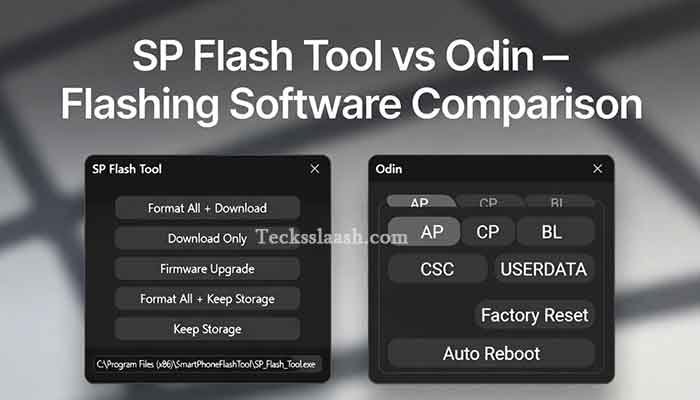
| Software | Platform | Chipset Support | Cost | Best Use Case |
|---|---|---|---|---|
| SP Flash Tool | PC (Windows) | MediaTek | Free | Firmware flashing, unbrick |
| Odin | PC (Windows) | Samsung (Qualcomm/Exynos) | Free | Samsung firmware, recovery |
| TWRP | Android (on-device) | Universal | Free | Custom ROM, backups |
| Miracle Box | PC (Windows) | Multi | Paid | Repair shops, IMEI fix |
| WebADB | Browser (Online) | Universal (limited) | Free | ADB commands, sideload |
| Fastboot Tool | PC (Windows/Mac/Linux) | Qualcomm | Free | Bootloader unlock, flashing |
Common Problems & Practical Solutions
Problem 1: Phone not detected by SP Flash Tool This is almost always a driver issue. Solution: Install the MTK VCOM USB Driver manually, restart your PC, and try again in Download Mode (hold Volume Down while connecting).
Problem 2: Odin shows “FAIL!” during flash Usually caused by mismatched firmware. Double-check your exact model number (Settings > About Phone) and re-download the firmware specifically for that variant. Never use a firmware meant for a different region.
Problem 3: TWRP not surviving reboot Some phones (especially newer Xiaomi and Samsung) have system partitions that overwrite TWRP on boot. Solution: Flash TWRP as a Magisk module or disable “dm-verity” during the initial flash.
Problem 4: Phone bootloops after flashing custom ROM Nine times out of ten, this is because you didn’t do a full wipe (System, Data, Cache, Dalvik) before flashing. Always do a clean flash when switching ROMs.
Frequently Asked Questions
Q1: What is Flashing Tech and is it safe?
Flashing Tech refers to tools and methods used to install new firmware or software on mobile phones. It’s safe when done correctly with the right firmware for your exact device. The biggest risks are using wrong firmware or skipping important steps like wiping data.
Q2: Can I use Flashing Tech online without a PC?
Partially. Online tools like WebADB work for basic tasks, but full firmware flashing almost always requires a PC-based tool like SP Flash Tool or Odin.
Q3: Which is the best Flashing Tech app for Android?
TWRP Recovery is the most widely used and trusted flashing app for Android. It lets you flash ROMs, create backups, and wipe partitions directly from your phone.
Q4: Does flashing void my warranty?
In most cases, yes. Unlocking the bootloader (required before most custom flashing) is detected by manufacturers and typically voids the warranty. Some brands like Xiaomi are more open about it than others.
Q5: What’s the best Flashing Software for PC in 2026?
For MediaTek phones, SP Flash Tool. For Samsung, Odin. For Qualcomm devices, the ADB Fastboot tool paired with the correct firmware is your best bet.
My Final Verdict
Flashing is one of those skills that feels intimidating until you’ve done it a couple of times—and then it becomes second nature. The key is always preparation: know your chipset, get your firmware from official or trusted sources, and never skip the backup step.
If you’re just starting out, I’d suggest beginning with TWRP on a supported device and get comfortable with the environment before moving to full firmware flashing via PC tools.
And if you’re a repair-shop owner or power user dealing with multiple devices daily, investing in Miracle Box or a similar professional tool is worth it long-term.
Have you tried any of these flashing tools? Did you run into any issues I didn’t cover here? Drop your experience in the comments below—I read every single one, and your question might help someone else too!