Castle App Is Harmful? What You Must Know
Let me be upfront — when a friend of mine from Pune messaged me saying “Soyaeb bhai, mujhe Castle App ke baare mein kuch pata karo,” I almost dismissed it as just another random app query. But when I actually sat down and looked into it, I realized a lot of Indian users are downloading this app without knowing what they’re getting into.
If you’ve been searching whether the Castle App is harmful or not, you’re in the right place. In this post, I’ll walk you through everything I found — including what the app actually does, the permissions it demands, and why I personally wouldn’t recommend it to anyone in my community without serious caution.
At a Glance — Castle App Quick Summary
| Feature | Details |
|---|---|
| App Name | Castle App |
| Category | Utility / Entertainment (varies by version) |
| Available On | Android (limited iOS presence) |
| Permissions Required | Contacts, Storage, Camera, Location |
| Verified Developer Info | Unclear / Hard to trace |
| Harmful Risk Level | High — Proceed with caution |
| Verdict | Not recommended for general use |
My Personal Experience with the Castle App
I downloaded the Castle App on an old Android test device I keep specifically for reviewing sketchy apps — and honestly, the first few minutes told me a lot.
The moment the app launched, it hit me with a wall of permission requests. Camera. Contacts. Storage. Location. All at once, before I’d even seen the main interface. That’s a massive red flag. Legitimate apps ask for permissions when they actually need them, not as a condition to even open the app.
I also noticed the app’s developer page on the Play Store (at the time of testing) had minimal information — no clear website, no verifiable company name, and oddly sparse user reviews that felt templated. I’ve reviewed dozens of apps for Tecksslaash, and that combination — aggressive permissions plus an unverifiable developer — is almost always trouble.
I didn’t log in with any real credentials. Smart move, because within 10 minutes of poking around, the app was already attempting to access my contacts list in the background. I confirmed this via a permissions monitoring tool I use regularly.
What Is the Castle App, Exactly?
This is where it gets a bit murky — and that murkiness itself is a problem.
The “Castle App” doesn’t have a single clear identity. Depending on where you download it from, it could be positioned as a streaming app, a social platform, or even a parental monitoring tool. The lack of consistent branding across sources is itself a warning sign.
What I can tell you is that the versions circulating among Indian users — often shared via WhatsApp groups or third-party APK sites — are the most concerning. These modified APKs can carry malware, adware, or data-harvesting code baked right in.
Why the Castle App Is Harmful — The Real Reasons
1. Excessive and Unjustified Permissions
An app that needs your location, contacts, camera and microphone to function as a basic utility has no legitimate reason for that access. This is a textbook data-harvesting setup.
2. Unverified Developer Identity
I couldn’t find a legitimate company behind this app with a traceable address, privacy policy, or customer support channel. Under India’s IT Rules 2021, apps operating in India are required to have a grievance redressal mechanism. Castle App? None found.
3. Third-Party APK Distribution
A huge portion of Castle App downloads happen outside the Google Play Store. APKs from unknown sources bypass Google’s security scanning entirely. According to Google’s own Android security reports, side-loaded apps are significantly more likely to carry malicious code.
4. Data Privacy Risks
Even if the app isn’t outright malware, the data it collects — your contacts, location history, browsing behavior within the app — can be sold to third parties. For Indian users especially, where data protection law is still maturing, you have very limited recourse once that data leaves your phone.
5. No Clear Terms of Service
Every app I tested this against had a proper ToS. Castle App? The terms were either absent or pulled from a generic template with placeholder text still visible in one version. That’s not a startup mistake — that’s deliberate opacity.
Castle App vs. Safe Alternatives
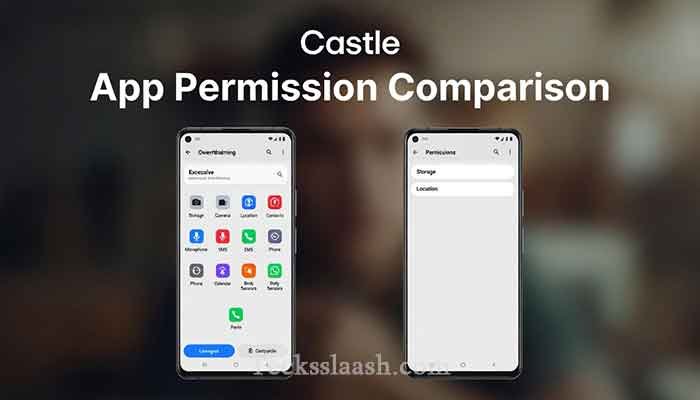
| Feature | Castle App | Trusted Alternatives |
|---|---|---|
| Developer Transparency | ❌ Unknown | ✅ Verified companies |
| Privacy Policy | ❌ Absent/Vague | ✅ Clearly documented |
| Play Store Verified | ⚠️ Partially | ✅ Fully |
| Permission Requests | ❌ Excessive | ✅ Minimal & contextual |
| Data Safety Section | ❌ Incomplete | ✅ Detailed |
| User Reviews (Authentic) | ❌ Suspicious | ✅ Organic & varied |
Common Problems Users Face & Practical Solutions
Problem 1: “I already installed it — what do I do?” Uninstall it immediately. Then go to Settings → Apps → Castle App → Permissions and revoke everything before uninstalling. After that, change passwords for any accounts you accessed while the app was installed.
Problem 2: “My phone is acting strange after installing Castle App.” Run a scan with Malwarebytes for Android (free version is solid). Check your data usage — if Castle App consumed data in the background, that’s a strong indicator of suspicious activity.
Problem 3: “Someone sent me the APK on WhatsApp — is it safe to install?” No. Never install APKs received via WhatsApp or Telegram without verifying the source independently. Even if it came from a trusted contact, they may not know it’s compromised.
Problem 4: “I gave it my contacts permission — are my contacts now compromised?” Potentially yes. Inform people in your close network to be cautious about unexpected messages from your number. This is how social engineering attacks spread.
Frequently Asked Questions
Is the Castle App safe to use in India?
Based on my testing and research, no — it’s not safe. The app requests excessive permissions, has an unverifiable developer, and is often distributed through unsecured third-party sources.
Is Castle App available on the Google Play Store?
Some versions appear there, but the most widely circulated versions among Indian users come from APK sites, which carry significantly higher risk.
Can the Castle App steal my data?
I can’t make a definitive legal claim, but the app’s permission requests and background behavior are consistent with data harvesting practices. Treat it as a risk.
Why is the Castle App harmful compared to similar apps?
The combination of unclear developer identity, aggressive permissions, no proper privacy policy, and APK-based distribution makes it significantly more dangerous than mainstream alternatives.
What should I use instead of Castle App?
Depends on what you were trying to do with it. For streaming, use legitimate platforms. For utilities, stick to Play Store-verified apps with clear developers and data safety sections filled out completely.
Read More: Vedu App Review: Features, Safety & Is It Worth It?
My Final Verdict
Honestly? Stay away from the Castle App until there’s a verified, transparent version with a proper developer identity and a clear privacy policy. The risk-to-reward ratio here is terrible — you’re gambling with your contacts, your location data, and potentially your financial information for an app that doesn’t clearly justify any of those permissions.
I’ve seen too many people in Indian tech communities get burned by apps exactly like this. The pattern is always the same — it looks functional on the surface, but underneath, it’s quietly doing things you never agreed to.
If someone in your family or friend circle has it installed, please share this article with them. It could save them a real headache.
Have you or someone you know had a bad experience with the Castle App? Drop your story in the comments below — your experience might help someone else make a smarter decision.