Aadhaar Biometric Lock & Unlock: Simple Step-by-Step Guide
Let me tell you something that shook me a little. A few months back, my cousin called me in a panic — someone had tried to use his Aadhaar for a SIM card verification he never authorized. Luckily nothing went through, but the scare was real. That’s when I started digging deep into Aadhaar biometric security features, and honestly, I was surprised how few people know this option even exists.
If you’re worried about unauthorized fingerprint or iris-based authentication on your Aadhaar, this guide is exactly what you need. I’ll walk you through what Aadhaar biometric locking actually means, why it matters, and how to do it — step by step, without the tech jargon.
At a Glance: Quick Summary
| Feature | Details |
|---|---|
| What it does | Locks/unlocks fingerprint & iris authentication |
| Who controls it | You (the Aadhaar holder) |
| Where to do it | UIDAI website or mAadhaar app |
| Is it free? | Yes, completely free |
| Time to activate | Instant |
| Can you reverse it? | Yes, unlock anytime |
My Personal Experience with Aadhaar Biometric Security
After my cousin’s incident, I locked my own biometric data the same evening. And I’ll be honest — I expected it to be a nightmare. Government portals, you know how it goes.
But I was wrong. The UIDAI portal was straightforward once I knew where to look. The mistake I almost made? I tried looking for the option under “Update Aadhaar” — it’s not there. It’s under “My Aadhaar” → “Aadhaar Services” → “Lock/Unlock Biometrics”. That one wrong turn cost me 10 minutes of confusion. So I’m saving you that detour right now.
One thing I personally observed: after locking, I tried doing a fingerprint-based eKYC at a nearby CSC just to test it — and it was rejected immediately. The lock works. That gave me real confidence in this feature.
What Is Aadhaar Biometric Locking and Why Should You Care?
Your Aadhaar biometric data — fingerprints and iris scans — is used for authentication in banks, SIM activations, PDS systems, and more. When you lock your biometric data, no one can use your fingerprints or iris to authenticate anything on your behalf, even if they somehow have your Aadhaar number.
It’s essentially a digital padlock on the most sensitive part of your identity. And the best part? You hold the only key.
How to Lock Your Aadhaar Biometric Data (Step-by-Step)
Method 1: Via UIDAI Website
- Go to uidai.gov.in
- Click on “My Aadhaar” in the top menu
- Under Aadhaar Services, select “Lock/Unlock Biometrics”
- Enter your 12-digit Aadhaar number and the security captcha
- Click “Send OTP” — this goes to your registered mobile number
- Enter the OTP and click “Verify & Proceed”
- You’ll see an option to Enable Biometric Lock — click it
- Confirm, and you’re done
That’s it. You’ll get a confirmation SMS on your registered mobile.
Method 2: Via mAadhaar App
- Download the mAadhaar app from Google Play or App Store
- Log in with your Aadhaar number and registered mobile
- Go to “Biometric Lock” from the dashboard
- Toggle the lock ON
- Authenticate with OTP
The app method is honestly faster if your phone number is already registered.
How to Unlock Aadhaar Biometric (When You Need It)
Locking is great, but there are situations — like opening a new bank account or doing Jeevan Praman — where you’ll need to temporarily unlock. Here’s how:
| Unlock Method | Steps | Time Taken |
|---|---|---|
| UIDAI Website | Same path as locking, choose “Disable Lock” | 1–2 minutes |
| mAadhaar App | Toggle biometric lock OFF | Under 1 minute |
| Temporary Unlock | Available via UIDAI portal, valid for one-time use | Instant, auto re-locks |
The temporary unlock option is gold — it lets you authenticate once and then automatically re-locks your biometric. I use this whenever I need to verify at a bank branch. No need to remember to re-lock manually.
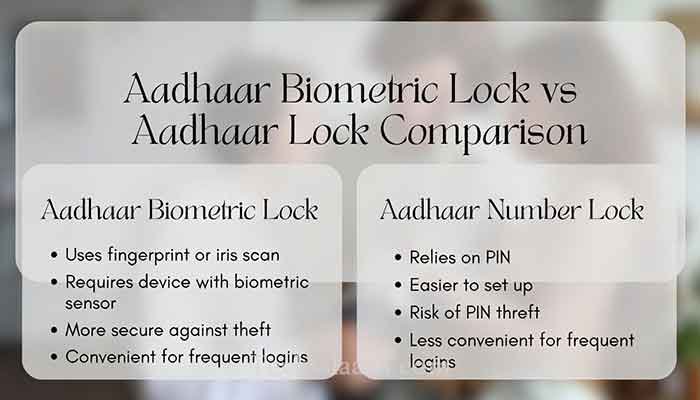
Aadhaar Biometric Lock vs Aadhaar Lock: What’s the Difference?
This trips up a LOT of people, so let me clear it up.
| Feature | Aadhaar Biometric Lock | Aadhaar Lock (VID-based) |
|---|---|---|
| What it locks | Fingerprint & iris authentication only | Your 12-digit Aadhaar number itself |
| Still usable for? | OTP-based auth still works | Only VID (Virtual ID) can be used |
| Best for | Preventing biometric fraud | Hiding your actual Aadhaar number |
| Can be used together? | Yes, both can be active simultaneously | Yes |
My recommendation: use both. They work as a double layer of protection.
Read More: UIDAI Official Page on Biometric Locking — uidai.gov.in
Common Problems & Practical Solutions
Problem 1: OTP not received Your mobile number may not be registered with Aadhaar. Visit the nearest Aadhaar Seva Kendra to update your number — you can’t do this online yet.
Problem 2: “Invalid Aadhaar” error on portal Double-check you’re entering the 12-digit number without spaces. Also, UIDAI portals do go through maintenance windows — try again after 30 minutes.
Problem 3: Forgot to unlock before going to the bank Use the temporary unlock feature on the UIDAI site or mAadhaar app right before your appointment. It takes under a minute, and you can do it from your phone.
Problem 4: Biometric lock not working even after enabling Log out of mAadhaar and log back in. Sometimes the sync takes a minute or two. If the issue persists, the UIDAI helpline (1947) is actually quite responsive.
Frequently Asked Questions
Q1. Does locking Aadhaar biometric affect my Aadhaar card’s validity?
Not at all. Your Aadhaar card remains valid. Only fingerprint and iris-based authentication gets blocked — OTP-based verification still works normally.
Q2. Can someone unlock my biometric without my knowledge?
No. Unlocking requires an OTP sent to your registered mobile number. Without access to your phone, it’s not possible.
Q3. Is Aadhaar biometric lock available for all Aadhaar holders?
Yes, it’s free and available to every Aadhaar holder with a registered mobile number. No special requirements.
Q4. How long does the temporary unlock last?
The temporary unlock is valid for a single authentication or a limited time window (typically the current session). After that, it automatically re-locks.
Q5. What if I don’t have a registered mobile number with Aadhaar?
Unfortunately, you cannot use online biometric lock/unlock without a registered mobile. You’ll need to visit an Aadhaar Seva Kendra to update your mobile number first.
Conclusion: Lock It Before You Regret It
Honestly, Aadhaar biometric locking is one of the most underused security features in India. It takes two minutes, costs nothing, and can save you from serious identity fraud. After walking through this myself — and watching it protect my cousin’s peace of mind — I wouldn’t skip it.
My Final Tip: Enable the biometric lock today and use temporary unlock only when needed. Pair it with Aadhaar’s VID lock for maximum protection. Your identity is worth those two minutes.
Have you ever locked your Aadhaar biometric, or are you doing it for the first time after reading this? Drop your experience or questions in the comments — I read every single one and I’d love to help.