TVS Accelerator App Review: Is It Worth Using? (2026)
If you own a modern TVS bike — an Apache, iQube, or Ntorq — chances are someone in a Facebook group or at a service center told you to “download the TVS Accelerator app.” I remember staring at my phone thinking: is this actually useful or just another bloatware app I’ll delete in a week?
In this post, I’m going to walk you through everything about the TVS Accelerator app — what it actually does, what I found genuinely useful, and where it frustrated me. No fluff, just my real experience.
At a Glance: TVS Accelerator App Summary
| Feature | Details |
|---|---|
| App Name | TVS Accelerator |
| Platform | Android & iOS |
| Price | Free |
| Best For | TVS connected vehicle owners |
| Standout Feature | Ride analytics & vehicle health tracking |
| My Verdict | Useful for commuters, great for Apache & iQube owners |
My Personal Experience with the TVS Accelerator App
I’ll be honest — my first week with this app was frustrating. I paired it with my TVS Apache RTR 165 RP, and the Bluetooth connection kept dropping mid-ride. I thought the app was broken. Turns out, I hadn’t updated the bike’s ECU firmware, which the service center sorted out during my next visit. After that? Night and day difference.
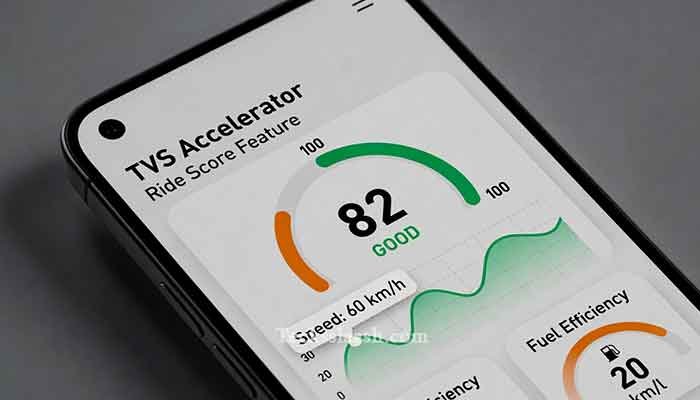
What really got me hooked was the ride score feature. After every commute, the app would show me my acceleration patterns, braking behavior, and top speed. I’m a pretty aggressive rider, and seeing a score of 54/100 on my first recorded ride genuinely made me reconsider how I was riding in city traffic. Over two months, I brought that score up to 78 — and I noticed my fuel efficiency improved by nearly 12%.
That’s not a claim from a brochure. That’s from my own ride data.
What Is the TVS Accelerator App?
The TVS Accelerator app is TVS Motor Company’s official connected mobility platform. It links to compatible TVS vehicles via Bluetooth and, in some models, through the SmartXonnect system.
Think of it as a digital co-pilot that tracks your ride, monitors your vehicle’s health, and keeps your service records in one place.
Key Features of the TVS Accelerator App
- Ride Analytics – Speed, distance, fuel efficiency, and riding behavior scored after every trip
- Vehicle Health Monitoring – Real-time alerts for low battery, service reminders, and diagnostics
- Trip History – A log of every ride with route maps (on select models)
- Service Booking – Book your nearest TVS service center directly from the app
- Document Vault – Store RC, insurance, and PUC documents digitally
- Community & Challenges – Riding challenges where you can compare scores with other TVS riders
TVS Accelerator App Download: How to Get It
Getting the app is straightforward:
- Open Google Play Store (Android) or Apple App Store (iOS)
- Search for “TVS Accelerator”
- Download the official app by TVS Motor Company
- Register with your mobile number and link your vehicle using the chassis number
Pro tip: Make sure your vehicle is listed as a compatible model before downloading. Older TVS bikes without SmartXonnect won’t give you real-time data — though you can still use the service booking and document features.
Read More: TVS Motor Company Official Website for compatible vehicle list
TVS Accelerator App Features: A Deeper Look
Ride Score & Analytics — The Real Value
This is where the app earns its place on your phone. After each ride, you get a breakdown across three parameters: Speed Management, Acceleration, and Braking. Each is scored independently, then averaged.
For daily commuters trying to maximize fuel economy, this feedback loop is genuinely helpful. For performance riders, it’s a useful mirror — even if your ego takes a hit.
Vehicle Health Alerts
The app sends push notifications for upcoming service intervals, low tire pressure (on iQube), and battery health. I received a low battery warning two days before my Apache actually struggled to start — which saved me a surprise breakdown.
Service Booking
This feature alone justifies keeping the app installed. You can see nearby authorized centers, check their hours, and book a slot. No more calling and being put on hold.
TVS Accelerator vs. Competing Apps: A Quick Comparison
| Feature | TVS Accelerator | Bajaj Ride Connect | Hero Ride Guide |
|---|---|---|---|
| Ride Analytics | ✅ Yes | ✅ Yes | ❌ Limited |
| Real-time Vehicle Data | ✅ (compatible models) | ✅ | ❌ |
| Service Booking | ✅ | ✅ | ✅ |
| Document Storage | ✅ | ❌ | ✅ |
| Community Features | ✅ | ❌ | ❌ |
| iOS Support | ✅ | ✅ | ✅ |
TVS Accelerator is one of the more feature-complete OEM apps in the Indian market right now. The community challenges are a nice touch that none of the competitors currently match.
Common Problems & Practical Solutions
1. Bluetooth Keeps Disconnecting
This was my issue too. Fix: Update your bike’s firmware at the service center and ensure your phone’s Bluetooth isn’t set to low-power mode. Also, don’t use a phone case that blocks signals (thick metal cases are notorious for this).
2. Ride Data Not Recording
If trips aren’t logging, the app likely didn’t detect your ride start. Fix: Open the app before you start riding, not after. The session needs to initialize with an active Bluetooth connection.
3. App Crashes on Older Android Phones
Users on Android 9 or below have reported instability. Fix: Clear the app cache regularly under Settings > Apps > TVS Accelerator > Storage. If it persists, try uninstalling and reinstalling after a phone restart.
4. Vehicle Not Linking Properly
Some users enter the wrong chassis number format. Fix: Use the full 17-digit VIN from your RC book, not the engine number. These are different, and it’s an easy mistake.
Read More: Tech Hence Smartwatch Review: Worth Your Money? (2026)
Frequently Asked Questions
Q: Is the TVS Accelerator app free?
Yes, the app is completely free to download and use. There are no premium tiers or subscription fees as of now.
Q: Which TVS bikes are compatible with the Accelerator app?
Models with the SmartXonnect system get full real-time features — this includes the Apache RTR 160/200 series, iQube electric scooter, and Ntorq 125 Race XP. Older models can still use the app for service booking and documents.
Q: Can I use the TVS Accelerator app without Bluetooth connection?
Yes, partially. Service booking, document vault, and community features work without Bluetooth. Ride analytics and vehicle health data require active pairing.
Q: Is the TVS Accelerator app available for iPhone?
Yes, it’s available on both the Apple App Store and Google Play Store.
Q: Does the app drain phone battery significantly?
From my experience, running the app with active Bluetooth for a 30-minute commute used about 3–4% extra battery. Not terrible, but worth knowing if you’re on an older phone.
Conclusion: My Final Verdict on TVS Accelerator
If you own a compatible TVS bike, this app isn’t optional — it’s genuinely useful. The ride analytics alone changed how I ride, the service booking saves time, and the document vault has bailed me out at checkposts more than once.
Is it perfect? No. Bluetooth stability can be finicky, and the UI could use a polish update. But for a free OEM app in India, TVS Accelerator is one of the best available right now.
My advice: download it, pair it, and actually use the ride score to improve your riding. Give it two weeks before judging.
What’s your experience been with the TVS Accelerator app? Did it change how you ride, or did it frustrate you? Drop your thoughts in the comments — I read every single one.