Gamma AI Review: Create Stunning Presentations for Free
Let me be real with you — I used to dread making presentations. Spending 3-4 hours on PowerPoint slides, adjusting alignments pixel by pixel, choosing fonts, and then someone would still say “the design looks basic.” Sound familiar?
If you’re an Indian student, freelancer, or professional who regularly needs to pitch ideas, present reports, or create decks for clients — you know this pain. That’s exactly why I got curious about Gamma AI, a tool that promises to turn your rough thoughts into a polished, beautiful presentation in minutes.
In this post, I’ll walk you through everything I’ve personally tested about Gamma AI — what works, what doesn’t, and whether the free plan is actually worth it.
At a Glance: Gamma AI Quick Summary
| Feature | Details |
|---|---|
| Tool Name | Gamma AI |
| Primary Use | AI-powered presentation & document maker |
| Free Plan Available? | Yes (with watermark & limited credits) |
| Pricing (Paid) | Starts at ~$8/month (Plus plan) |
| Best For | Students, freelancers, professionals |
| Supported Formats | Presentations, Docs, Webpages |
| Export Options | PDF, PPT (paid), shareable link |
| AI Model Used | GPT-based generation |
| Verdict | ⭐⭐⭐⭐½ — Highly Recommended |
My Personal Experience with Gamma AI
About six months ago, I had to put together a presentation for a brand partnership proposal — 15 slides, overnight, after a full day of work. I’d heard about Gamma from a Twitter thread and figured I’d give it a shot.
I typed in my topic, chose a theme, and within about 40 seconds — I’m not exaggerating — Gamma had generated a 12-slide deck with headings, bullet points, relevant icons, and a clean visual layout. I spent maybe 20 more minutes tweaking the copy and swapping a couple of images. That was it.
Honestly, the biggest mistake I made early on was treating Gamma like a magic button. I once typed a super vague prompt like “marketing presentation” and got a generic output that needed heavy editing. The lesson? The more context you give Gamma in your prompt, the better the output. Once I started writing detailed prompts — including the audience, the goal, and the key points — the results became dramatically better.
Read More: Sarvam AI: India’s AI Startup You Should Know About
What Exactly Is Gamma AI?
Gamma AI is a web-based presentation and content creation tool that uses artificial intelligence to generate slides, documents, and even webpages from a simple text prompt. Unlike traditional tools like PowerPoint or Google Slides, Gamma handles both the design and content simultaneously.
It was built with the idea that most people aren’t designers — and frankly, they shouldn’t have to be just to communicate an idea effectively.
How to Use Gamma AI for Free (Step-by-Step)
Using Gamma AI for free is straightforward. Here’s exactly how to get started:
Step 1 — Sign Up Go to gamma.app and sign up with your Google account. No credit card needed.
Step 2 — Choose Your Format You can create a Presentation, Document, or Webpage. For most people, “Presentation” is the go-to.
Step 3 — Write Your Prompt This is where the magic happens. Type a detailed description of what you want. For example: “Create a 10-slide investor pitch for a food delivery startup targeting Tier 2 Indian cities, covering problem, solution, market size, team, and financials.”
Step 4 — Pick a Theme Gamma offers a solid range of themes — from minimal and corporate to bold and colorful. Pick what fits your audience.
Step 5 — Let AI Generate, Then Edit Within seconds, your deck is ready. Click on any card (slide) to edit text, swap images, add charts, or restructure content.
Step 6 — Share or Export Share via a public link for free. To export as PDF or PPT, you’ll need a paid plan.
Gamma AI Free vs Paid: Is the Free Plan Enough?
This is the question I get asked most — and here’s my take.
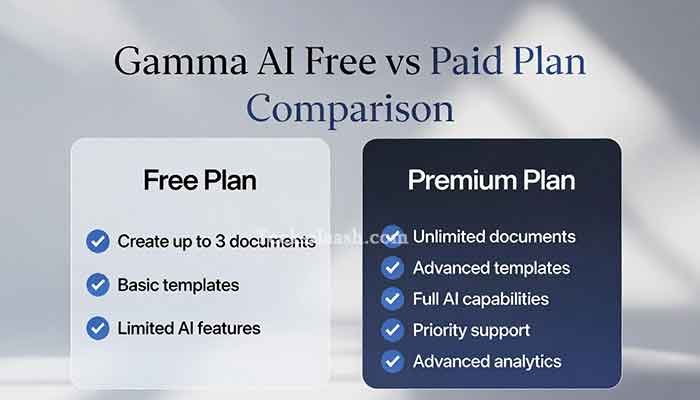
| Feature | Free Plan | Plus Plan (~$8/mo) |
|---|---|---|
| AI Credits | 400 one-time credits | 400 credits/month |
| Watermark | Yes (Gamma branding) | No |
| Export to PDF | ✅ | ✅ |
| Export to PPT | ❌ | ✅ |
| Custom Domain | ❌ | ✅ |
| Analytics | ❌ | ✅ |
| AI Image Generation | Limited | More credits |
For students and casual users, the free plan is genuinely useful. You can create, share, and present directly from the browser. The watermark is a small price to pay. But if you’re a freelancer delivering work to clients or a professional in a corporate setting, the Plus plan is worth it — the PPT export alone makes it professional-grade.
Gamma AI as a PPT Maker: How Good Is It Really?
When I compare Gamma AI as a PPT maker to traditional tools, a few things stand out:
What Gamma does better than PowerPoint:
- Speed — a full deck in under a minute
- Design consistency — no mismatched fonts or awkward spacing
- AI rewriting — you can ask it to rephrase any slide in a different tone
- Responsive layouts that adapt to different screen sizes
Where PowerPoint still wins:
- Granular design control (pixel-level adjustments)
- Complex animations and transitions
- Offline access
- Deep integration with Microsoft ecosystem
Gamma isn’t trying to replace PowerPoint for power users. It’s trying to remove the friction for everyone else — and it does that job really well.
Common Problems & Practical Solutions
Problem 1: AI generates too generic or shallow content Solution: Always write a detailed prompt with your target audience, purpose, and key talking points. Think of it like briefing a junior designer — the more you tell it, the better the output.
Problem 2: Can’t export to PPT on free plan Solution: Use the shareable link for presentations, or export to PDF and convert to PPT using a free converter like Smallpdf. Not perfect, but it works in a pinch.
Problem 3: Images look irrelevant or low quality Solution: Gamma lets you replace AI-picked images manually. Use the “Unsplash” or “upload your own” option within the editor. Always double-check visuals before presenting.
Problem 4: Running out of free AI credits quickly Solution: Credits are used per AI generation. To save them, write a thorough first prompt rather than regenerating multiple times. Plan your content before hitting generate.
Frequently Asked Questions
Is Gamma AI completely free to use?
Yes, Gamma AI has a free plan that gives you 400 one-time credits to generate content. It includes a watermark and limited exports, but for basic use and sharing via link, it’s completely free.
Can Gamma AI export presentations to PowerPoint format?
PPT export is available on the paid Plus plan (~$8/month). On the free plan, you can export to PDF or share via a browser link.
How is Gamma AI different from Google Slides or PowerPoint?
Gamma uses AI to generate both the content and the design simultaneously from a text prompt. Traditional tools require you to build everything manually. Gamma is faster, but less customizable at a granular level.
Is Gamma AI good for students in India?
Absolutely. It’s free to start, works entirely in the browser (no installation needed), and is perfect for college projects, seminars, and assignments. The English output quality is strong.
Does Gamma AI support Hindi or other Indian languages?
Currently, Gamma AI works best in English. You can manually type Hindi text into slides after generation, but the AI generation itself is English-first. This is one area where I’d love to see improvement.
Conclusion: My Final Verdict on Gamma AI
If you’re tired of spending hours on presentations that still look mediocre, Gamma AI is genuinely worth trying. The free plan gives you enough to evaluate it properly, and for most Indian students and early-stage professionals, it’ll handle 80% of your presentation needs without you spending a rupee.
My personal recommendation? Start with the free plan, use it for 2-3 real projects, and you’ll know very quickly whether the Plus plan makes sense for you. For me, it became a no-brainer after my second client deck.
The tool isn’t perfect — the free credit system can feel restrictive, and PPT export being paywalled is a genuine limitation. But what it does offer for free is miles ahead of staring at a blank PowerPoint at midnight.
What about you? Have you tried Gamma AI yet, or are you still on the fence? Drop your thoughts in the comments below — I’d love to know what you’re using it for!