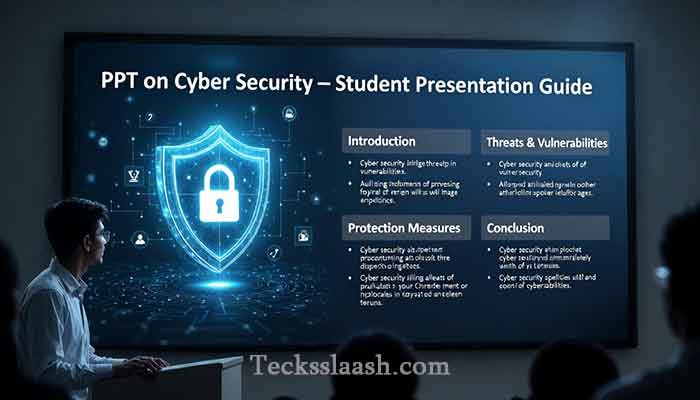
PPT on Cyber Security: Make Slides Students Actually Love
Introduction
Let me be honest with you. The first time I had to put together a PPT on Cyber Security for a college seminar, I had absolutely no idea where to start. I Googled “cyber security presentation,” downloaded some random 40-slide deck, and walked into the room thinking I was set. Within five minutes, half the students were on their phones. That stung.
Cyber security is genuinely one of the most important topics in tech today — especially for Indian students entering the workforce. But most presentations on this subject are either too technical, too dull, or stuffed with so much jargon that the audience checks out before slide three.
In this post, I’m going to walk you through exactly how to build a PPT on Cyber Security that is well-structured, visually clean, and actually useful for students. Whether you’re a teacher, a student doing a class project, or someone prepping for a seminar, this guide is for you.
At a Glance: Quick Summary Table
| Element | Details |
|---|---|
| Target Audience | School/College Students, Teachers |
| Ideal Slide Count | 12–18 slides |
| Recommended Tool | Microsoft PowerPoint / Google Slides / Canva |
| Key Topics to Cover | Threats, Safety Tips, Case Studies, Laws |
| Free Download Available? | Yes (templates linked below) |
| Difficulty Level | Beginner to Intermediate |
| Time to Build | 2–4 hours |
My Personal Experience with Creating a PPT on Cyber Security
Back in 2021, I was invited to give a guest talk at a local engineering college in Pune on the topic of online safety. The coordinator specifically asked me to make a “simple PPT on cyber security for students” — nothing too heavy.
I made what I thought was a solid deck. Technical diagrams, lots of bullet points, Wikipedia-style definitions. I even added a flowchart of how a DDoS attack works. Sounds impressive, right?
Nope. The audience was gone by slide seven.
After the session, a student came up to me and said, “Bhaiya, can you just tell us what not to do on Instagram?” That hit differently. These students didn’t need a textbook. They needed practical, relatable information tied to their actual lives.
That’s when I completely rebuilt my approach. I started with a real-world story (a recent phishing scam in India), added screenshots of fake SMS messages people receive, and replaced most of my definitions with “what this means for YOU” type content.
The next time I presented? Students were asking questions before I even finished the slide. One of them said it was the first tech presentation that didn’t put him to sleep.
That’s the experience I want to help you create.
Read More: UPI Payment Safety Tips You Must Follow in 2026
Why Most Cyber Security PPTs Fail
Before we get into the structure, let’s quickly address what goes wrong. In my observation, most presentations fail for three core reasons:
- Too much text per slide. Students can’t read and listen at the same time.
- No local context. Talking about cybercrime without mentioning Indian examples (like UPI fraud or SIM swapping) makes it feel irrelevant.
- Zero storytelling. Data without a story is just noise.
Keep these in mind as you build your deck.
How to Make a PPT on Cyber Security: Step-by-Step Structure
Step 1: Start with a Hook Slide
Your first slide after the title should be a question or a shocking statistic. Something like:
“India reported over 13 lakh cyber fraud complaints in 2023. How many of them could have been you?”
This immediately grabs attention and makes the topic personal.
Step 2: Define Cyber Security in Simple Terms
Don’t open with a dictionary definition. Instead, use an analogy. I like to say: “Cyber security is like locking your house — except your house is your phone, your bank account, and your entire identity.”
One slide, one big idea. That’s all.
Step 3: Cover the Core Topics (But Keep It Tight)
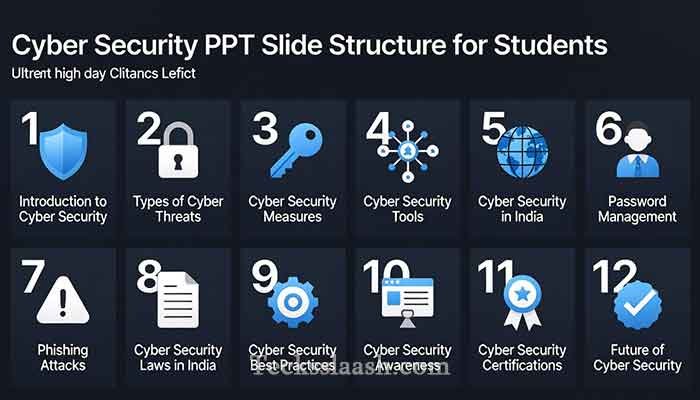
Here’s a recommended content flow for a PPT on Cyber Security for students:
| Slide | Topic | Content Tip |
|---|---|---|
| 1 | Title Slide | Name, topic, date, your college/org name |
| 2 | Hook / Opening Stat | One shocking fact, full-screen visual |
| 3 | What is Cyber Security? | Simple definition + analogy |
| 4 | Types of Cyber Threats | Use icons, not paragraphs |
| 5 | Phishing Explained | Real SMS/email screenshot example |
| 6 | Malware & Ransomware | Brief + real-world case (WannaCry, 2017) |
| 7 | Password Safety | Do’s and Don’ts — make it visual |
| 8 | Social Media Safety | Instagram/WhatsApp specific tips |
| 9 | Cyber Laws in India | IT Act 2000, Section 66 |
| 10 | Real Case Study | Recent Indian cyber fraud |
| 11 | How to Report Cybercrime | cybercrime.gov.in, 1930 helpline |
| 12 | Key Takeaways | 5 bullet points max |
| 13 | Q&A Slide | Simple, open, inviting |
Step 4: Design Principles That Matter
Design is half the battle. Here’s what works:
- Use dark backgrounds for tech presentations — they look professional and reduce eye strain.
- Stick to 2 fonts maximum. One for headings (bold), one for body (clean and readable).
- Every slide should have a visual — an icon, chart, or image. Avoid walls of text.
- Use consistent colors. I personally prefer a dark navy + cyan/electric blue palette for cyber security topics — it just feels right for the subject.
Step 5: Add a Real Indian Case Study
This is your secret weapon. Find a recent cyber crime incident from India — something from CERT-In reports or news like Economic Times Tech. Present it as a story:
- What happened?
- How did the victim fall for it?
- What should they have done differently?
Even one good case study can make your entire presentation memorable.
Read More: Visit cybercrime.gov.in — India’s official cybercrime reporting portal — to reference authentic stats and reporting procedures in your presentation.
Free Download: PPT on Cyber Security Templates
If you don’t want to build from scratch, here are the best places to get a solid base:
- Canva — Search “Cyber Security Presentation” and you’ll find dozens of free, editable templates
- SlidesCarnival.com — Free Google Slides templates with professional designs
- SlideMania — Minimal, clean templates you can customize easily
- Google Slides Template Gallery — Basic but reliable
My honest tip: Don’t download and present as-is. Always customize with your own examples, your college name, and local Indian context. Templates are a starting point, not a finished product.
Common Problems & Practical Solutions
Problem 1: “My slides look boring and cluttered”
Solution: Remove 50% of the text from every slide. Replace it with one strong visual or icon. Use tools like Flaticon or Noun Project for free icons. Less is more — always.
Problem 2: “I don’t know what topics to include”
Solution: Follow the 13-slide structure I shared above. Cover threats, safety tips, Indian laws, and a real case study. That covers everything a student audience needs.
Problem 3: “The audience isn’t engaging”
Solution: Build in interaction. Add a “Guess the Threat” quiz slide where you show a fake phishing email and ask the audience to spot the red flags. This wakes people up immediately.
Problem 4: “I need a free PPT on Cyber Security for download”
Solution: Canva and SlideMania both offer excellent free templates. Just search “cyber security” and filter by free. Customize before using — personalization always makes a bigger impact than generic slides.
Frequently Asked Questions
Q1: What should a PPT on Cyber Security for students include?
It should cover the definition of cyber security, major types of threats (phishing, malware, ransomware), password safety, social media risks, relevant Indian cyber laws, and a real-world case study. Keep it practical and relevant to student life.
Q2: How many slides should a cyber security presentation have?
For a 15–20 minute presentation, 12–15 slides is ideal. Avoid going over 18 slides — you’ll lose your audience. Quality and clarity beat quantity every time.
Q3: Where can I find a free PPT on Cyber Security for download?
Canva, SlidesCarnival, and SlideMania all offer free, customizable templates. Always personalize them with local examples and your own content before presenting.
Q4: How do I make my cyber security PPT more engaging?
Start with a shocking statistic or story, use real Indian examples, add interactive quiz slides, and keep visuals clean and minimal. Storytelling is your most powerful tool.
Q5: Which Indian laws should I mention in a cyber security presentation?
The IT Act 2000 is the primary legislation. Specifically, Section 66 (hacking), Section 67 (publishing obscene material), and Section 43 (unauthorized access) are most relevant for a student-level presentation.
Conclusion
Building a great PPT on Cyber Security isn’t about cramming in every technical term you know. It’s about connecting with your audience — especially students who are already living their digital lives on Instagram, UPI apps, and WhatsApp.
My final verdict: Keep it simple, make it visual, anchor it in real Indian examples, and always tell a story. That’s the formula that works.
Start with the 13-slide structure, grab a free template from Canva, and customize it with one powerful case study from your region. You’ll walk out of that room with students who actually learned something — and that’s what matters.
What’s your experience been like with cyber security presentations? Have you tried any specific tips that worked really well? Drop your thoughts in the comments below — I read every single one.